<!-- 建築引用文庫 / ホーム -->
<header>
  <a href="/">建築引用文庫</a>
  <nav aria-label="メインナビゲーション">
    <a href="/database">データベース</a>
    <a href="/mylist">マイリスト</a>
  </nav>
</header>

<main>
  <section>
    <p>CONCEPT</p>
    <h2>建築引用文庫</h2>
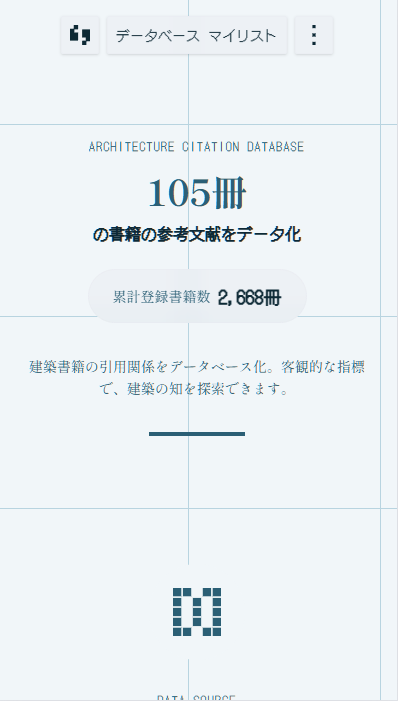
    <p>建築書籍の引用関係を調査し可視化したサービスです。</p>
    <p>現在 <span>2,629</span> 冊の書籍を収録</p>
  </section>
  <section>
    <h2>被引用数ランキング</h2>
  </section>
</main>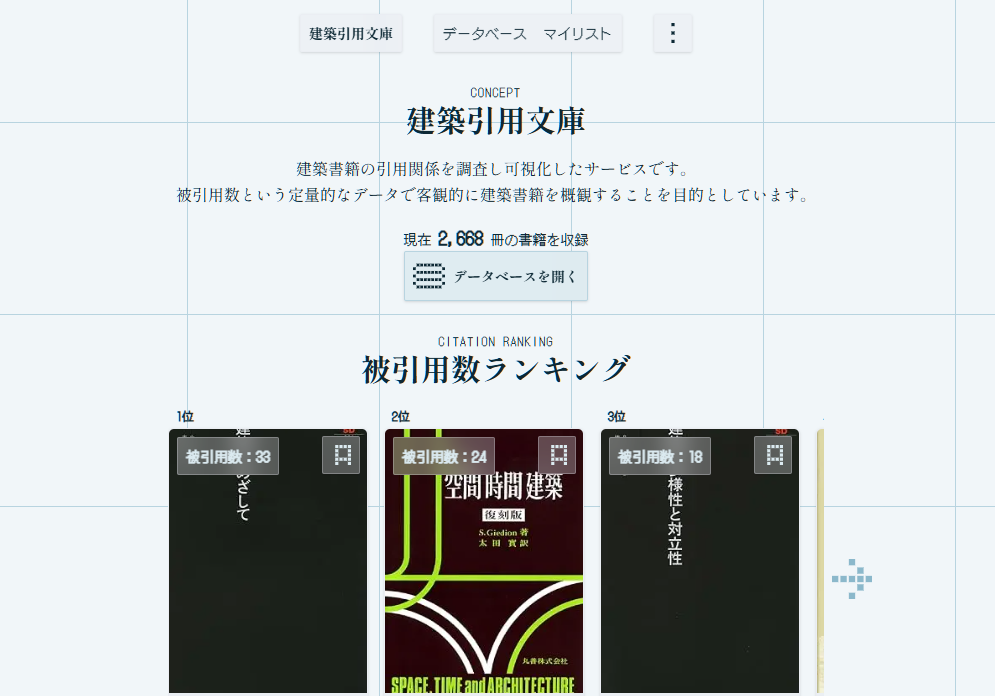

// 建築引用文庫 / books/[id]/page.tsx
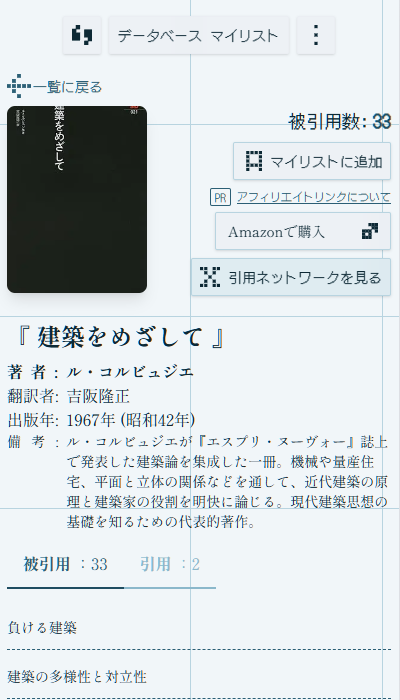
export const revalidate = 86400; // ISR: 24 時間ごとに再生成

export default async function BookDetailPage({ params }: Props) {
  const { id } = await params;
  const { book, citingBooks, citedByBooks } = await fetchBookDetails(id);
  if (!book) notFound();

  return (
    <div className="container mx-auto">
      <BookBreadcrumb />
      <BookInfo book={book} />
      <CitationTabs citingBooks={citingBooks} citedByBooks={citedByBooks} />
    </div>
  );
}
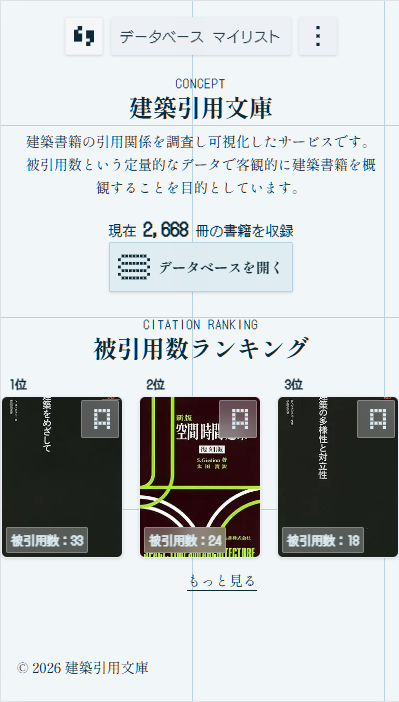
// 建築引用文庫 / CitationTabs.tsx: 被引用と引用をタブで切り替える
export const CitationTabs = ({ citingBooks, citedByBooks }: Props) => (
  <Tabs className="w-full">
    <TabList aria-label="引用関係" className="flex mb-4">
      <TabHeaderItem id="cited-by" label="被引用" count={citedByBooks.length} />
      <TabHeaderItem id="citing" label="引用" count={citingBooks.length} />
    </TabList>
    <TabPanel id="cited-by">
      <ul>{citedByBooks.map((book) => <BookListItem key={book.id} book={book} />)}</ul>
    </TabPanel>
    <TabPanel id="citing">
      <ul>{citingBooks.map((book) => <BookListItem key={book.id} book={book} />)}</ul>
    </TabPanel>
  </Tabs>
);
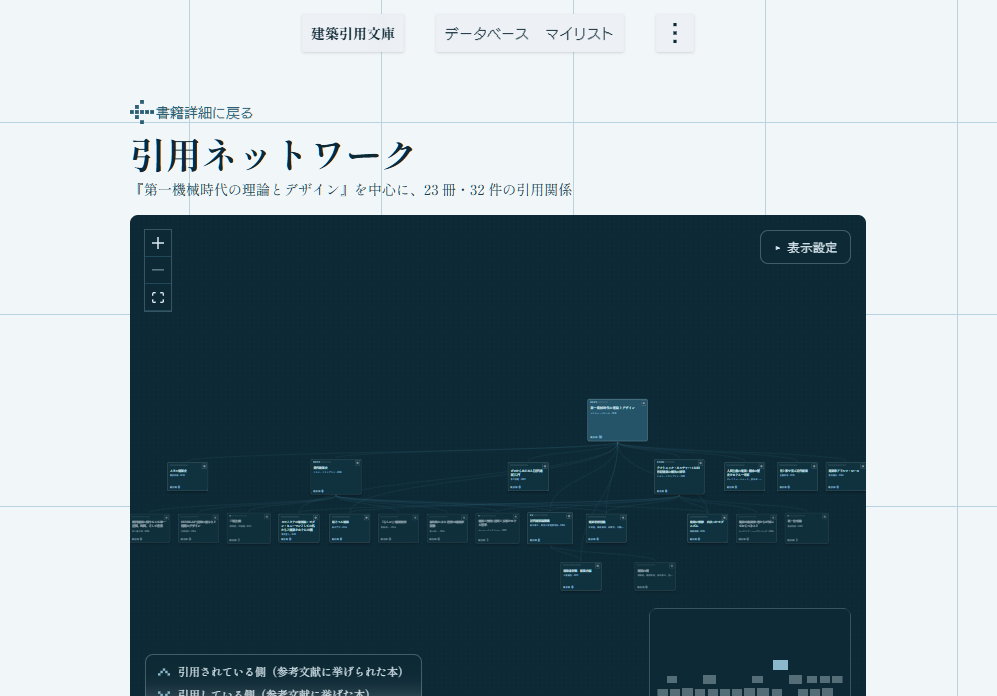
// 建築引用文庫 / lib/graph.ts: 中心からの最短ホップ数 (無向) を求める
export const computeNodeDepths = (
  centerId: string,
  nodeIds: readonly string[],
  edges: readonly GraphEdge[],
  maxDepth: number,
): Map<string, number> => {
  const { cites, citedBy } = buildAdjacency(edges);
  const depths = new Map(nodeIds.map((id) => [id, maxDepth]));
  depths.set(centerId, 0);
  const queue = [centerId];
  while (queue.length > 0) {
    const current = queue.shift();
    if (current === undefined) break;
    const next = (depths.get(current) ?? 0) + 1;
    for (const id of [...(cites.get(current) ?? []), ...(citedBy.get(current) ?? [])]) {
      if ((depths.get(id) ?? Infinity) > next) {
        depths.set(id, next);
        queue.push(id);
      }
    }
  }
  return depths;
};





// 建築引用文庫 / app/stats/page.tsx: 建築書の割合を求めて統計を描く
const calculateArchitectureStats = (genres: GenreDistribution[]) => {
  const architecture = genres.filter((g) => g.is_architecture).reduce((s, g) => s + g.count, 0);
  const other = genres.filter((g) => !g.is_architecture).reduce((s, g) => s + g.count, 0);
  const total = architecture + other;
  return { architecture, other, percentage: total > 0 ? (architecture / total) * 100 : 0 };
};

export default async function StatsPage() {
  const stats = await fetchStats();
  const { architecture, other, percentage } = calculateArchitectureStats(stats.genre_distribution);
  return (
    <div className="stats-page">
      <HeroSection citingBookCount={stats.summary.citing_book_count} />
      <GenreSection architecturePercentage={percentage} architectureCount={architecture} otherCount={other} />
      <TopBooksSection topBooks={stats.top_cited_books} />
    </div>
  );
}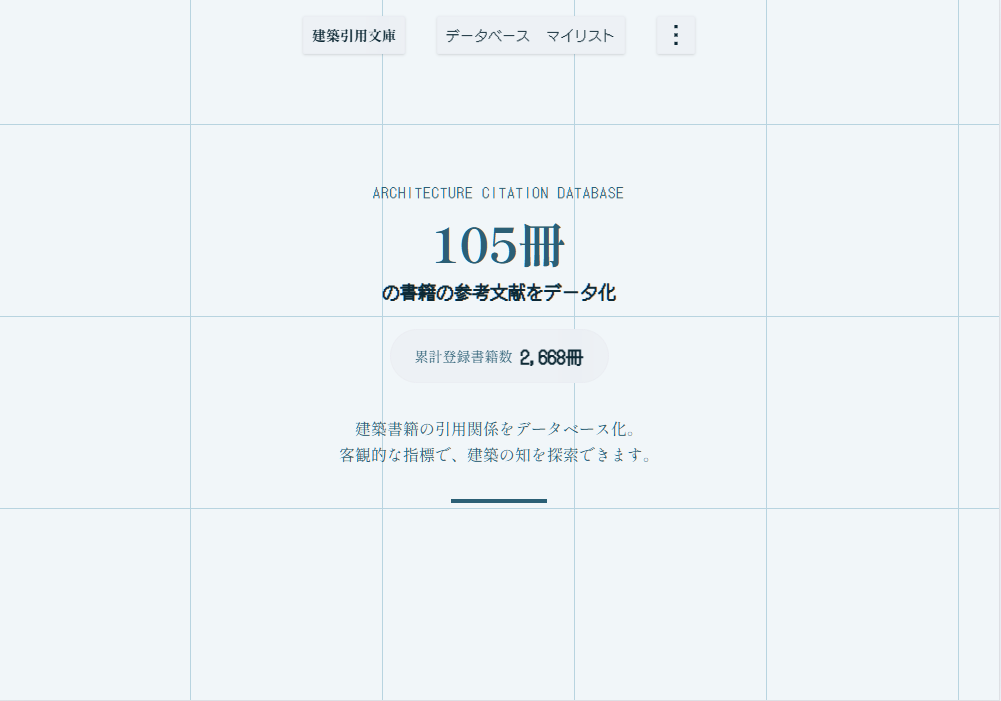
「建築引用文庫」 建築書の引用関係を数値化・可視化するWebアプリ。「建築書をどれから読むべきかわからなかった。」という自身の学生時代の経験を元に、論文のインパクトファクターのような客観的な評価軸を提供することを目的に開発した。
arch-bunko.jp ↗

// NEWTIER / question-bank/schema.ts: 問題カードの型
export type QuestionFormat = { kind: "single" } | { kind: "multiple"; select: 2 | 3 };
export type QuestionArchetype = "recall" | "scenario" | "comparison" | "remediation";

export type QuestionCard = {
  readonly id: string;            // kebab-case。公開後に変更・再利用しない
  readonly taskId: string;        // 試験ガイドのタスク (例: "saa-1.1")
  readonly archetype: QuestionArchetype;
  readonly format: QuestionFormat;
  readonly question: string;
  readonly correct: readonly string[];       // single は 1 つ、multiple は select の数
  readonly nearMisses: readonly string[];    // 要件の一部は満たすが最適ではない選択肢
  readonly wrongAnswers: readonly string[];  // 問題文の条件で除外できる選択肢。常に 2 つ
  readonly explanation: string;
  readonly chapterIds: readonly string[];    // 根拠となる章。先頭が主な章
};
// NEWTIER / quiz-engine/grading.ts: 答案の採点 (純関数)。未回答は本番と同じく不正解に数える
export function gradeSheet(questions: readonly GradableQuestion[], entries: readonly SheetEntry[]): SheetGrade {
  const results = questions.map((question, i) => gradeEntry(question, entries[i]));
  const correct = results.filter((r) => r === "correct").length;
  const unanswered = results.filter((r) => r === "unanswered").length;
  return {
    results,
    total: questions.length,
    answered: questions.length - unanswered,
    correct,
    incorrect: questions.length - unanswered - correct,
    unanswered,
  };
}

/** 合格の目安 (%)。合格スコアの最大スコアに対する割合 (720/1000 → 72) */
export const passLinePercent = ({ passingScore, maxScore }: PassLineSource): number =>
  Math.round((passingScore / maxScore) * 1000) / 10;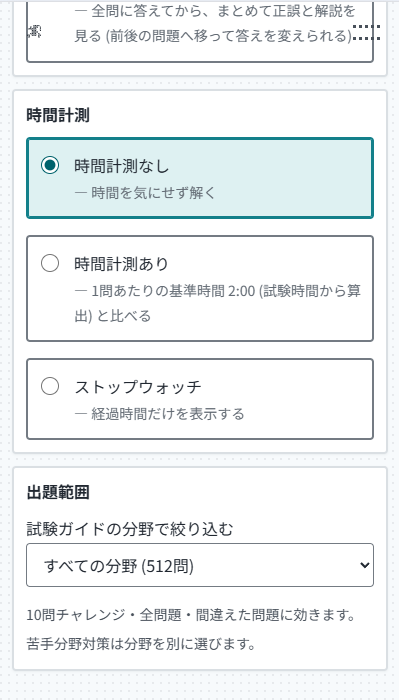
// NEWTIER / quiz-engine/mock-exam.ts: 模擬試験の出題配分 (純関数。乱数は呼び出し側から受け取る)
//
// 1. 問題数を試験ガイドのドメインの比率で最大剰余法により配る
// 2. 在庫が足りないドメインの不足分は、残りのドメインへ比率で配り直す
// 3. ドメインの中はタスクの目標問題数の比で配り、1 つのタスクに偏らないようにする
// 4. タスクの中から重複なしで無作為に選び、最後に全体の出題順をシャッフルする
export type AllocationItem = {
  readonly key: string;
  readonly weight: number;    // 配分の重み (比率)
  readonly capacity: number;  // 配れる上限 (在庫)
};

export function allocateLargestRemainder(
  total: number,
  items: readonly AllocationItem[],
): ReadonlyMap<string, number> {
  // 端数の大きい順、同じなら重みの大きい順、同じなら並び順で 1 つずつ足す
  // ...
}


NEWTIER ↗
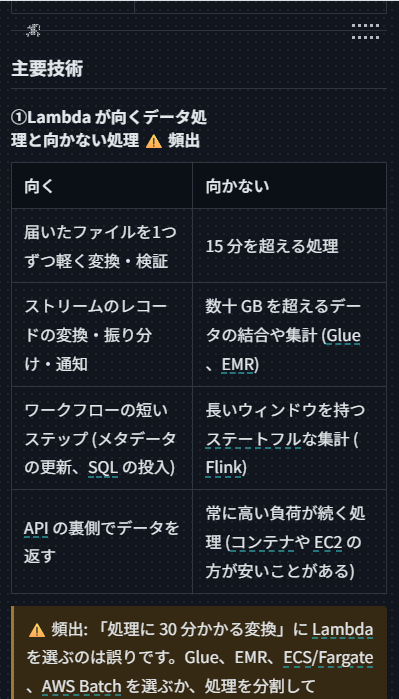
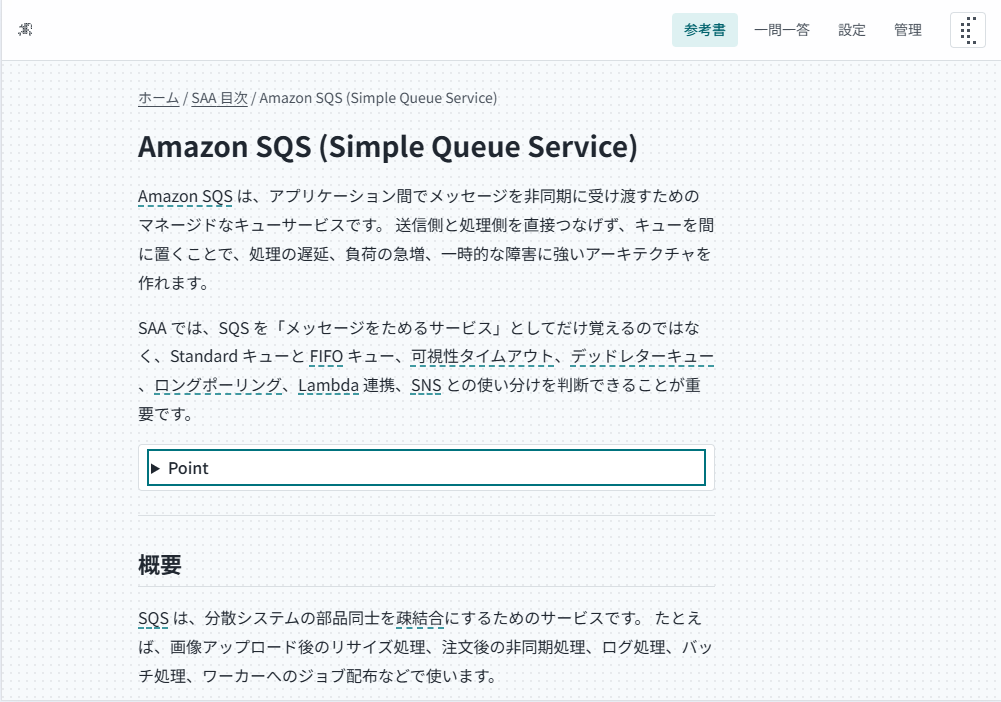
「NEWTIER」 AWS 認定資格の学習を支援する非公式アプリ。試験ガイドの分野ごとに参考書を読み進め、資格ごとの 10 問チャレンジや分野の絞り込みで本番レベルの問題を解く。模擬試験は試験ガイドの配分で出題し、採点と合格の目安、初回正答率から求めた難易度と優先復習分野で学習を導く。
// Color Follows Function / store/useColorStore.ts: パレットの状態と変更の経路
export type Color = { id: string; hex: string };
export type Unit = "single" | "pair" | "palette";
export type View = "verify" | "design";

/** palette 変更の唯一の経路 */
export type ColorChangeIntent =
  | { kind: "set"; id: string; hex: string }
  | { kind: "add"; hex: string }
  | { kind: "remove"; id: string }
  | { kind: "reorder"; order: string[] }
  | { kind: "replaceAll"; hexes: string[] };

export type ColorStore = {
  palette: Color[];
  unit: Unit;
  view: View;
  apply: (intent: ColorChangeIntent) => void;
};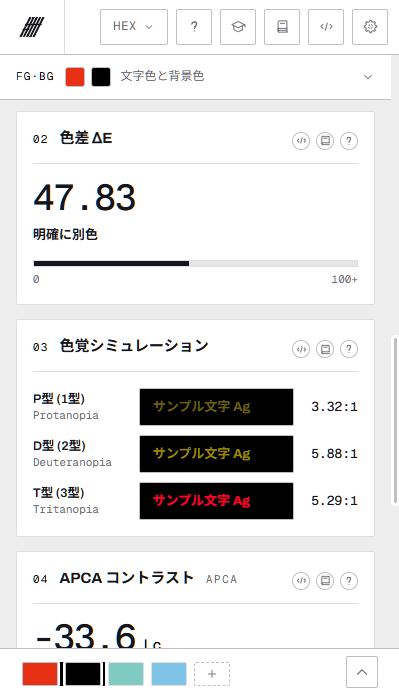
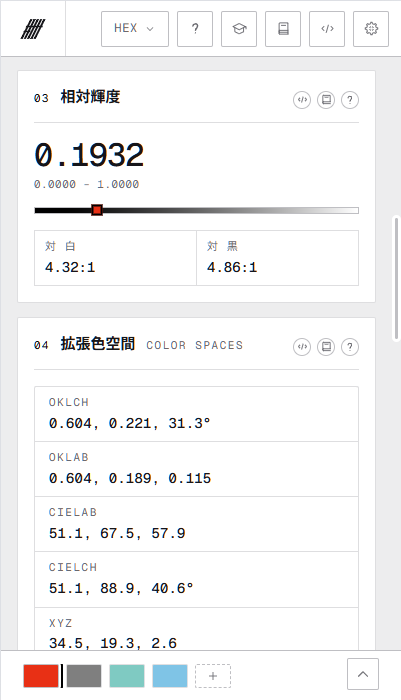
// Color Follows Function / CardDeltaE.tsx: 色差 ΔE (CIEDE2000) のカード
const labelKey = (de: number): MessageKey =>
  de < 1 ? "card.deltae.l0" : de < 2 ? "card.deltae.l1" : de < 10 ? "card.deltae.l2" : "card.deltae.l3";

export function CardDeltaE({ number }: CardProps) {
  const pair = usePairColors();
  const t = useT();
  const de = pair ? deltaE2000(rgbToLab(parseHex(pair.fg.hex)), rgbToLab(parseHex(pair.bg.hex))) : 0;

  return (
    <CardFrame number={number} title={t("card.deltae.title")} helpKey="deltae">
      <div className="font-mono text-5xl font-medium">{de.toFixed(2)}</div>
      <div className="text-[13px] font-bold">{t(labelKey(de))}</div>
      <div className="bg-(--text) h-[7px]" style={{ width: `${Math.min(100, de).toFixed(0)}%` }} />
    </CardFrame>
  );
}
// Color Follows Function / core/color/harmony.ts: トーン展開 (OKLCH の明度を補間)
const TONE_STEPS = [50, 100, 200, 300, 400, 500, 600, 700, 800, 900] as const;
const TONE_L_LIGHT = 0.97;
const TONE_L_DARK = 0.25;

/** 基準色を 500 に据え、淡い側は彩度も絞って白へ寄せる。sRGB 域外は色相を保ってガマットマッピング */
export function generateTones(base: RGB): Tone[] {
  const { l, c, h } = rgbToOklch(base);
  const lightMax = Math.max(TONE_L_LIGHT, l);
  const darkMin = Math.min(TONE_L_DARK, l);
  return TONE_STEPS.map((step) => {
    if (step === 500) return { step, rgb: base };
    if (step < 500) {
      const t = (500 - step) / 450;
      return { step, rgb: oklchToRgb({ l: l + (lightMax - l) * t, c: c * (1 - 0.75 * t), h }) };
    }
    const t = (step - 500) / 400;
    return { step, rgb: oklchToRgb({ l: l - (l - darkMin) * t, c: c * (1 - 0.25 * t), h }) };
  });
}

color-follows-function.net ↗
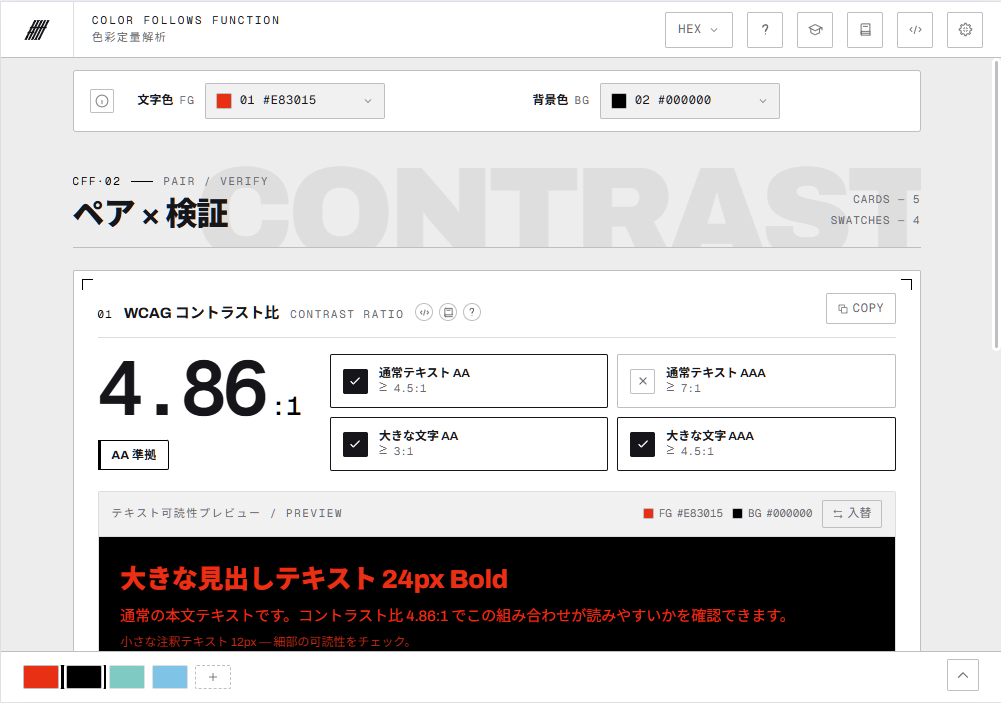
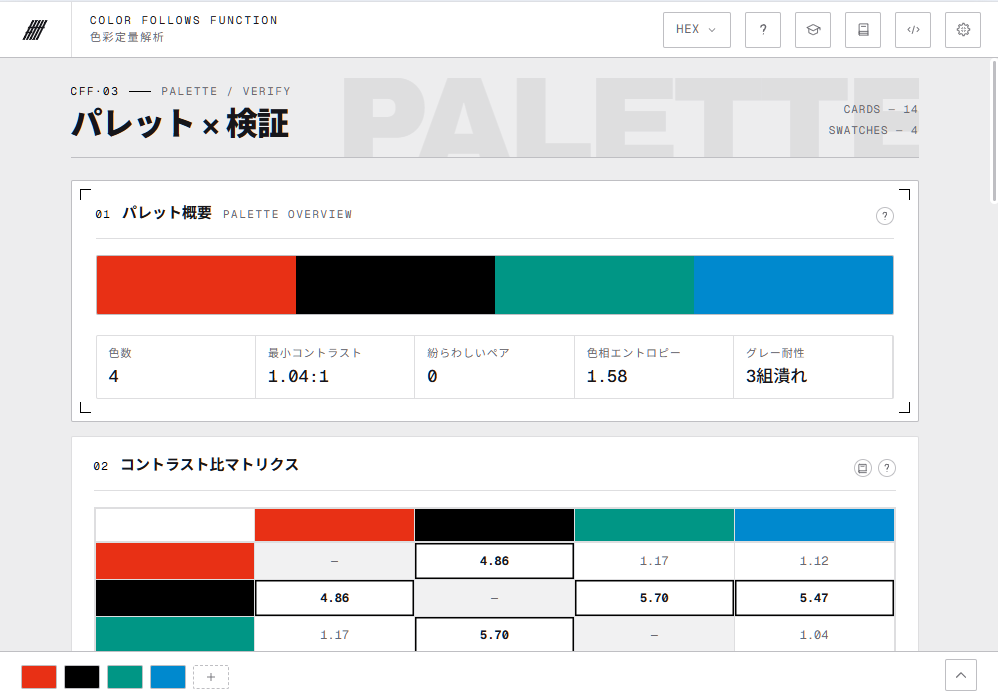
「Color Follows Function」 感覚で扱われがちな「色」を数値で判断できるようにする色彩定量解析ツール。コントラスト比・色差ΔE・色覚シミュレーションなどの指標で配色を検証し、トーン展開や調和スキームで配色を設計する。計算はすべてブラウザ内で完結し、色をサーバーへ送らない。
// dotterel-ui: DotButton (ホバーで中心からマスが塗り替わるリップル)
import { DotButton } from "dotterel-ui/button";
import { Icon } from "dotterel-ui/icon";

export const Actions = () => (
  <>
    <DotButton>保存</DotButton>
    <DotButton variant="primary">
      <Icon name="check" animation="hover" />
      公開する
    </DotButton>
    <DotButton variant="quiet">あとで</DotButton>
    <DotButton variant="danger">削除</DotButton>
  </>
);// dotterel-ui: DotCount (カウントアップ) と DotProgressValue (ドットの進捗)
import { DotCount } from "dotterel-ui/count";
import { DotProgressValue } from "dotterel-ui/progress";
export const Meters = () => (
<>
<DotCount to={12345} suffix=" PT" startOn="view" />
<DotProgressValue value={42} max={115} count={12} label="学習の進捗" />
<DotProgressValue value={7} max={10} shape="diamond" label="達成度" />
</>
);// dotterel-ui: 5x5 のドット行列で描くアイコン
import { Icon, ICON_NAMES } from "dotterel-ui/icon";
export const Gallery = () => (
<ul>
{ICON_NAMES.map((name) => (
<li key={name}>
<Icon name={name} size="lg" animation="hover" label={name} />
</li>
))}
</ul>
);


pnpm add dotterel-ui
showcase ↗
<!-- 建築引用文庫 / ホーム -->
<header>
  <a href="/">建築引用文庫</a>
  <nav aria-label="メインナビゲーション">
    <a href="/database">データベース</a>
    <a href="/mylist">マイリスト</a>
  </nav>
</header>

<main>
  <section>
    <p>CONCEPT</p>
    <h2>建築引用文庫</h2>
    <p>建築書籍の引用関係を調査し可視化したサービスです。</p>
    <p>現在 <span>2,629</span> 冊の書籍を収録</p>
  </section>
  <section>
    <h2>被引用数ランキング</h2>
  </section>
</main>
// 建築引用文庫 / books/[id]/page.tsx
export const revalidate = 86400; // ISR: 24 時間ごとに再生成
export default async function BookDetailPage({ params }: Props) {
const { id } = await params;
const { book, citingBooks, citedByBooks } = await fetchBookDetails(id);
if (!book) notFound();
return (
<div className="container mx-auto">
<BookBreadcrumb />
<BookInfo book={book} />
<CitationTabs citingBooks={citingBooks} citedByBooks={citedByBooks} />
</div>
);
}// 建築引用文庫 / CitationTabs.tsx: 被引用と引用をタブで切り替える
export const CitationTabs = ({ citingBooks, citedByBooks }: Props) => (
<Tabs className="w-full">
<TabList aria-label="引用関係" className="flex mb-4">
<TabHeaderItem id="cited-by" label="被引用" count={citedByBooks.length} />
<TabHeaderItem id="citing" label="引用" count={citingBooks.length} />
</TabList>
<TabPanel id="cited-by">
<ul>{citedByBooks.map((book) => <BookListItem key={book.id} book={book} />)}</ul>
</TabPanel>
<TabPanel id="citing">
<ul>{citingBooks.map((book) => <BookListItem key={book.id} book={book} />)}</ul>
</TabPanel>
</Tabs>
);// 建築引用文庫 / lib/graph.ts: 中心からの最短ホップ数 (無向) を求める
export const computeNodeDepths = (
centerId: string,
nodeIds: readonly string[],
edges: readonly GraphEdge[],
maxDepth: number,
): Map<string, number> => {
const { cites, citedBy } = buildAdjacency(edges);
const depths = new Map(nodeIds.map((id) => [id, maxDepth]));
depths.set(centerId, 0);
const queue = [centerId];
while (queue.length > 0) {
const current = queue.shift();
if (current === undefined) break;
const next = (depths.get(current) ?? 0) + 1;
for (const id of [...(cites.get(current) ?? []), ...(citedBy.get(current) ?? [])]) {
if ((depths.get(id) ?? Infinity) > next) {
depths.set(id, next);
queue.push(id);
}
}
}
return depths;
};「建築引用文庫」 建築書の引用関係を数値化・可視化するWebアプリ。「建築書をどれから読むべきかわからなかった。」という自身の学生時代の経験を元に、論文のインパクトファクターのような客観的な評価軸を提供することを目的に開発した。
arch-bunko.jp ↗
// NEWTIER / question-bank/schema.ts: 問題カードの型
export type QuestionFormat = { kind: "single" } | { kind: "multiple"; select: 2 | 3 };
export type QuestionArchetype = "recall" | "scenario" | "comparison" | "remediation";

export type QuestionCard = {
  readonly id: string;            // kebab-case。公開後に変更・再利用しない
  readonly taskId: string;        // 試験ガイドのタスク (例: "saa-1.1")
  readonly archetype: QuestionArchetype;
  readonly format: QuestionFormat;
  readonly question: string;
  readonly correct: readonly string[];       // single は 1 つ、multiple は select の数
  readonly nearMisses: readonly string[];    // 要件の一部は満たすが最適ではない選択肢
  readonly wrongAnswers: readonly string[];  // 問題文の条件で除外できる選択肢。常に 2 つ
  readonly explanation: string;
  readonly chapterIds: readonly string[];    // 根拠となる章。先頭が主な章
};
// NEWTIER / quiz-engine/mock-exam.ts: 模擬試験の出題配分 (純関数。乱数は呼び出し側から受け取る)
//
// 1. 問題数を試験ガイドのドメインの比率で最大剰余法により配る
// 2. 在庫が足りないドメインの不足分は、残りのドメインへ比率で配り直す
// 3. ドメインの中はタスクの目標問題数の比で配り、1 つのタスクに偏らないようにする
// 4. タスクの中から重複なしで無作為に選び、最後に全体の出題順をシャッフルする
export type AllocationItem = {
readonly key: string;
readonly weight: number; // 配分の重み (比率)
readonly capacity: number; // 配れる上限 (在庫)
};
export function allocateLargestRemainder(
total: number,
items: readonly AllocationItem[],
): ReadonlyMap<string, number> {
// 端数の大きい順、同じなら重みの大きい順、同じなら並び順で 1 つずつ足す
// ...
}// 全体難易度: 初回回答の正答率を Laplace 平滑化して判定 (純関数)
type QuestionStats = { uniqueFirstAnswers: number; firstCorrect: number };
type Difficulty = "unrated" | "easy" | "standard" | "hard";
const DIFFICULTY_MIN_ANSWERS = 20;
/** Laplace 平滑化。unknown は不正解として扱う */
function smoothedAccuracy(stats: QuestionStats): number {
return (stats.firstCorrect + 1) / (stats.uniqueFirstAnswers + 2);
}
function judgeDifficulty(stats: QuestionStats): Difficulty {
if (stats.uniqueFirstAnswers < DIFFICULTY_MIN_ANSWERS) return "unrated";
const accuracy = smoothedAccuracy(stats);
if (accuracy >= 0.8) return "easy";
if (accuracy >= 0.5) return "standard";
return "hard";
}// NEWTIER / quiz-engine/grading.ts: 答案の採点 (純関数)。未回答は本番と同じく不正解に数える
export function gradeSheet(questions: readonly GradableQuestion[], entries: readonly SheetEntry[]): SheetGrade {
const results = questions.map((question, i) => gradeEntry(question, entries[i]));
const correct = results.filter((r) => r === "correct").length;
const unanswered = results.filter((r) => r === "unanswered").length;
return {
results,
total: questions.length,
answered: questions.length - unanswered,
correct,
incorrect: questions.length - unanswered - correct,
unanswered,
};
}
/** 合格の目安 (%)。合格スコアの最大スコアに対する割合 (720/1000 → 72) */
export const passLinePercent = ({ passingScore, maxScore }: PassLineSource): number =>
Math.round((passingScore / maxScore) * 1000) / 10;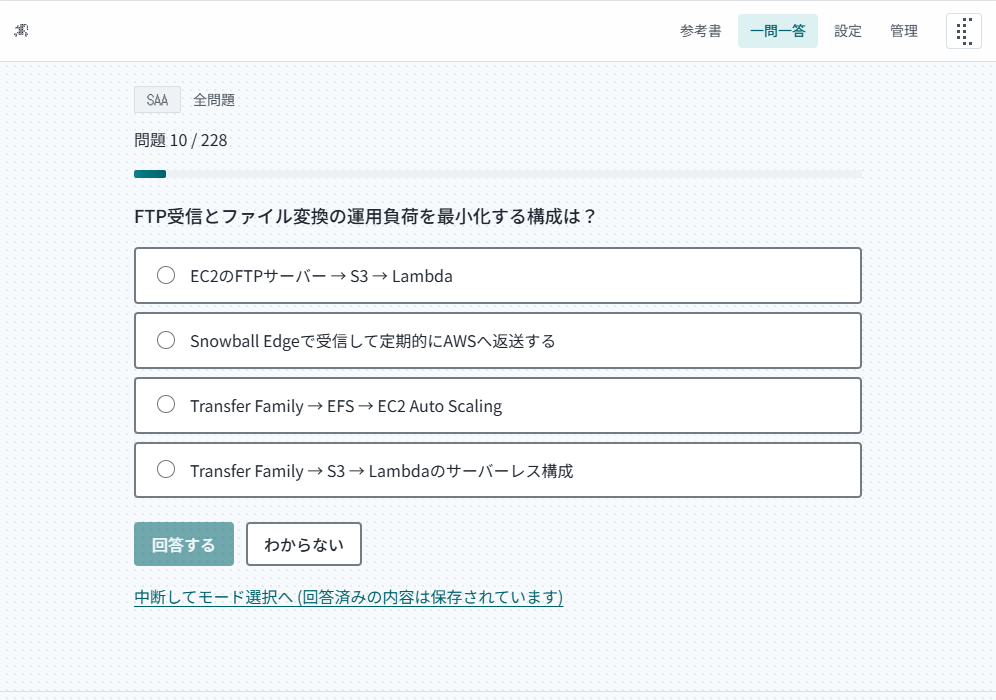
NEWTIER ↗
「NEWTIER」 AWS 認定資格の学習を支援する非公式アプリ。試験ガイドの分野ごとに参考書を読み進め、資格ごとの 10 問チャレンジや分野の絞り込みで本番レベルの問題を解く。模擬試験は試験ガイドの配分で出題し、採点と合格の目安、初回正答率から求めた難易度と優先復習分野で学習を導く。
// Color Follows Function / store/useColorStore.ts: パレットの状態と変更の経路
export type Color = { id: string; hex: string };
export type Unit = "single" | "pair" | "palette";
export type View = "verify" | "design";

/** palette 変更の唯一の経路 */
export type ColorChangeIntent =
  | { kind: "set"; id: string; hex: string }
  | { kind: "add"; hex: string }
  | { kind: "remove"; id: string }
  | { kind: "reorder"; order: string[] }
  | { kind: "replaceAll"; hexes: string[] };

export type ColorStore = {
  palette: Color[];
  unit: Unit;
  view: View;
  apply: (intent: ColorChangeIntent) => void;
};
// Color Follows Function / core/color/harmony.ts: トーン展開 (OKLCH の明度を補間)
const TONE_STEPS = [50, 100, 200, 300, 400, 500, 600, 700, 800, 900] as const;
const TONE_L_LIGHT = 0.97;
const TONE_L_DARK = 0.25;
/** 基準色を 500 に据え、淡い側は彩度も絞って白へ寄せる。sRGB 域外は色相を保ってガマットマッピング */
export function generateTones(base: RGB): Tone[] {
const { l, c, h } = rgbToOklch(base);
const lightMax = Math.max(TONE_L_LIGHT, l);
const darkMin = Math.min(TONE_L_DARK, l);
return TONE_STEPS.map((step) => {
if (step === 500) return { step, rgb: base };
if (step < 500) {
const t = (500 - step) / 450;
return { step, rgb: oklchToRgb({ l: l + (lightMax - l) * t, c: c * (1 - 0.75 * t), h }) };
}
const t = (step - 500) / 400;
return { step, rgb: oklchToRgb({ l: l - (l - darkMin) * t, c: c * (1 - 0.25 * t), h }) };
});
}// WCAG 相対輝度とコントラスト比
function relativeLuminance(rgb: RGB): number {
const { r, g, b } = normalizeRgb(rgb);
const R = srgbToLinear(r / 255);
const G = srgbToLinear(g / 255);
const B = srgbToLinear(b / 255);
return 0.2126 * R + 0.7152 * G + 0.0722 * B;
}
function contrastRatio(a: RGB, b: RGB): number {
const la = relativeLuminance(a);
const lb = relativeLuminance(b);
const hi = Math.max(la, lb);
const lo = Math.min(la, lb);
return (hi + 0.05) / (lo + 0.05);
}// Color Follows Function / core/color/contrast.ts: WCAG 2.1 のレベル判定
export type WcagVerdict = {
aaNormal: boolean; // 4.5:1
aaaNormal: boolean; // 7:1
aaLarge: boolean; // 3:1
ui: boolean; // UI 部品・グラフィック (3:1)
verdict: "AAA" | "AA" | "AA-large" | "fail";
};
/** 閾値は WCAG 2.1 SC 1.4.3 / 1.4.6 / 1.4.11 の事実値。判定は丸め前の ratio で行う */
export function judgeWcag(ratio: number): WcagVerdict {
const verdict = ratio >= 7 ? "AAA" : ratio >= 4.5 ? "AA" : ratio >= 3 ? "AA-large" : "fail";
return { aaNormal: ratio >= 4.5, aaaNormal: ratio >= 7, aaLarge: ratio >= 3, ui: ratio >= 3, verdict };
}
color-follows-function.net ↗
「Color Follows Function」 感覚で扱われがちな「色」を数値で判断できるようにする色彩定量解析ツール。コントラスト比・色差ΔE・色覚シミュレーションなどの指標で配色を検証し、トーン展開や調和スキームで配色を設計する。計算はすべてブラウザ内で完結し、色をサーバーへ送らない。
// dotterel-ui: DotButton (ホバーで中心からマスが塗り替わるリップル)
import { DotButton } from "dotterel-ui/button";
import { Icon } from "dotterel-ui/icon";

export const Actions = () => (
  <>
    <DotButton>保存</DotButton>
    <DotButton variant="primary">
      <Icon name="check" animation="hover" />
      公開する
    </DotButton>
    <DotButton variant="quiet">あとで</DotButton>
    <DotButton variant="danger">削除</DotButton>
  </>
);// dotterel-ui: DotCount (カウントアップ) と DotProgressValue (ドットの進捗)
import { DotCount } from "dotterel-ui/count";
import { DotProgressValue } from "dotterel-ui/progress";
export const Meters = () => (
<>
<DotCount to={12345} suffix=" PT" startOn="view" />
<DotProgressValue value={42} max={115} count={12} label="学習の進捗" />
<DotProgressValue value={7} max={10} shape="diamond" label="達成度" />
</>
);// dotterel-ui: 5x5 のドット行列で描くアイコン
import { Icon, ICON_NAMES } from "dotterel-ui/icon";
export const Gallery = () => (
<ul>
{ICON_NAMES.map((name) => (
<li key={name}>
<Icon name={name} size="lg" animation="hover" label={name} />
</li>
))}
</ul>
);pnpm add dotterel-ui
showcase ↗
<!-- 建築引用文庫 / ホーム -->
<header>
  <a href="/">建築引用文庫</a>
  <nav aria-label="メインナビゲーション">
    <a href="/database">データベース</a>
    <a href="/mylist">マイリスト</a>
  </nav>
</header>

<main>
  <section>
    <p>CONCEPT</p>
    <h2>建築引用文庫</h2>
    <p>建築書籍の引用関係を調査し可視化したサービスです。</p>
    <p>現在 <span>2,629</span> 冊の書籍を収録</p>
  </section>
  <section>
    <h2>被引用数ランキング</h2>
  </section>
</main>
// 建築引用文庫 / books/[id]/page.tsx
export const revalidate = 86400; // ISR: 24 時間ごとに再生成
export default async function BookDetailPage({ params }: Props) {
const { id } = await params;
const { book, citingBooks, citedByBooks } = await fetchBookDetails(id);
if (!book) notFound();
return (
<div className="container mx-auto">
<BookBreadcrumb />
<BookInfo book={book} />
<CitationTabs citingBooks={citingBooks} citedByBooks={citedByBooks} />
</div>
);
}// 建築引用文庫 / CitationTabs.tsx: 被引用と引用をタブで切り替える
export const CitationTabs = ({ citingBooks, citedByBooks }: Props) => (
<Tabs className="w-full">
<TabList aria-label="引用関係" className="flex mb-4">
<TabHeaderItem id="cited-by" label="被引用" count={citedByBooks.length} />
<TabHeaderItem id="citing" label="引用" count={citingBooks.length} />
</TabList>
<TabPanel id="cited-by">
<ul>{citedByBooks.map((book) => <BookListItem key={book.id} book={book} />)}</ul>
</TabPanel>
<TabPanel id="citing">
<ul>{citingBooks.map((book) => <BookListItem key={book.id} book={book} />)}</ul>
</TabPanel>
</Tabs>
);CREATE TYPE network_node AS (
id bigint,
title text,
cited_count int,
authors text[],
publication_year int
);
-- source = citing, target = cited
CREATE TYPE network_edge AS (source bigint, target bigint);// 建築引用文庫 / lib/graph.ts: 中心からの最短ホップ数 (無向) を求める
export const computeNodeDepths = (
centerId: string,
nodeIds: readonly string[],
edges: readonly GraphEdge[],
maxDepth: number,
): Map<string, number> => {
const { cites, citedBy } = buildAdjacency(edges);
const depths = new Map(nodeIds.map((id) => [id, maxDepth]));
depths.set(centerId, 0);
const queue = [centerId];
while (queue.length > 0) {
const current = queue.shift();
if (current === undefined) break;
const next = (depths.get(current) ?? 0) + 1;
for (const id of [...(cites.get(current) ?? []), ...(citedBy.get(current) ?? [])]) {
if ((depths.get(id) ?? Infinity) > next) {
depths.set(id, next);
queue.push(id);
}
}
}
return depths;
};// 建築引用文庫 / app/stats/page.tsx: 建築書の割合を求めて統計を描く
const calculateArchitectureStats = (genres: GenreDistribution[]) => {
const architecture = genres.filter((g) => g.is_architecture).reduce((s, g) => s + g.count, 0);
const other = genres.filter((g) => !g.is_architecture).reduce((s, g) => s + g.count, 0);
const total = architecture + other;
return { architecture, other, percentage: total > 0 ? (architecture / total) * 100 : 0 };
};
export default async function StatsPage() {
const stats = await fetchStats();
const { architecture, other, percentage } = calculateArchitectureStats(stats.genre_distribution);
return (
<div className="stats-page">
<HeroSection citingBookCount={stats.summary.citing_book_count} />
<GenreSection architecturePercentage={percentage} architectureCount={architecture} otherCount={other} />
<TopBooksSection topBooks={stats.top_cited_books} />
</div>
);
}// 建築引用文庫 / books/[id]/page.tsx
export const revalidate = 86400; // ISR: 24 時間ごとに再生成
export default async function BookDetailPage({ params }: Props) {
const { id } = await params;
const { book, citingBooks, citedByBooks } = await fetchBookDetails(id);
if (!book) notFound();
return (
<div className="container mx-auto">
<BookBreadcrumb />
<BookInfo book={book} />
<CitationTabs citingBooks={citingBooks} citedByBooks={citedByBooks} />
</div>
);
}
-- 建築引用文庫 / supabase: 引用ネットワークを再帰 CTE で辿る
CREATE OR REPLACE FUNCTION get_network_data(center_book_id bigint, depth int)
RETURNS TABLE(nodes network_node[], edges network_edge[])
AS $$
WITH RECURSIVE citation_network AS (
    -- 初期ステップ: 中心ノードに接続するエッジ
    SELECT citing_book_id AS from_id,
           cited_book_id  AS to_id,
           1              AS level
    FROM public.book_citations
    WHERE citing_book_id = center_book_id
       OR cited_book_id  = center_book_id

    UNION

    -- 再帰ステップ: 前ステップのエッジに接続する新しいエッジ
    SELECT c.citing_book_id AS from_id,
           c.cited_book_id  AS to_id,
           cn.level + 1     AS level
    FROM public.book_citations c
    JOIN citation_network cn
      ON (c.citing_book_id = cn.to_id
       OR c.cited_book_id  = cn.from_id)
    WHERE cn.level < depth
),
...
「建築引用文庫」 建築書の引用関係を数値化・可視化するWebアプリ。「建築書をどれから読むべきかわからなかった。」という自身の学生時代の経験を元に、論文のインパクトファクターのような客観的な評価軸を提供することを目的に開発した。
// NEWTIER / question-bank/schema.ts: 問題カードの型
export type QuestionFormat = { kind: "single" } | { kind: "multiple"; select: 2 | 3 };
export type QuestionArchetype = "recall" | "scenario" | "comparison" | "remediation";

export type QuestionCard = {
  readonly id: string;            // kebab-case。公開後に変更・再利用しない
  readonly taskId: string;        // 試験ガイドのタスク (例: "saa-1.1")
  readonly archetype: QuestionArchetype;
  readonly format: QuestionFormat;
  readonly question: string;
  readonly correct: readonly string[];       // single は 1 つ、multiple は select の数
  readonly nearMisses: readonly string[];    // 要件の一部は満たすが最適ではない選択肢
  readonly wrongAnswers: readonly string[];  // 問題文の条件で除外できる選択肢。常に 2 つ
  readonly explanation: string;
  readonly chapterIds: readonly string[];    // 根拠となる章。先頭が主な章
};
// NEWTIER / quiz-engine/mock-exam.ts: 模擬試験の出題配分 (純関数。乱数は呼び出し側から受け取る)
//
// 1. 問題数を試験ガイドのドメインの比率で最大剰余法により配る
// 2. 在庫が足りないドメインの不足分は、残りのドメインへ比率で配り直す
// 3. ドメインの中はタスクの目標問題数の比で配り、1 つのタスクに偏らないようにする
// 4. タスクの中から重複なしで無作為に選び、最後に全体の出題順をシャッフルする
export type AllocationItem = {
readonly key: string;
readonly weight: number; // 配分の重み (比率)
readonly capacity: number; // 配れる上限 (在庫)
};
export function allocateLargestRemainder(
total: number,
items: readonly AllocationItem[],
): ReadonlyMap<string, number> {
// 端数の大きい順、同じなら重みの大きい順、同じなら並び順で 1 つずつ足す
// ...
}// NEWTIER / quiz-engine/grading.ts: 答案の採点 (純関数)。未回答は本番と同じく不正解に数える
export function gradeSheet(questions: readonly GradableQuestion[], entries: readonly SheetEntry[]): SheetGrade {
const results = questions.map((question, i) => gradeEntry(question, entries[i]));
const correct = results.filter((r) => r === "correct").length;
const unanswered = results.filter((r) => r === "unanswered").length;
return {
results,
total: questions.length,
answered: questions.length - unanswered,
correct,
incorrect: questions.length - unanswered - correct,
unanswered,
};
}
/** 合格の目安 (%)。合格スコアの最大スコアに対する割合 (720/1000 → 72) */
export const passLinePercent = ({ passingScore, maxScore }: PassLineSource): number =>
Math.round((passingScore / maxScore) * 1000) / 10;// 合格の目安 (720/1000 → 72%) と正答率 (%)
type PassLineSource = { passingScore: number; maxScore: number };
function passLinePercent(format: PassLineSource): number {
return Math.round((format.passingScore / format.maxScore) * 1000) / 10;
}
function accuracyPercent(correct: number, total: number): number {
if (total <= 0) return 0;
return Math.round((correct / total) * 1000) / 10;
}// 全体難易度: 初回回答の正答率を Laplace 平滑化して判定 (純関数)
type QuestionStats = { uniqueFirstAnswers: number; firstCorrect: number };
type Difficulty = "unrated" | "easy" | "standard" | "hard";
const DIFFICULTY_MIN_ANSWERS = 20;
/** Laplace 平滑化。unknown は不正解として扱う */
function smoothedAccuracy(stats: QuestionStats): number {
return (stats.firstCorrect + 1) / (stats.uniqueFirstAnswers + 2);
}
function judgeDifficulty(stats: QuestionStats): Difficulty {
if (stats.uniqueFirstAnswers < DIFFICULTY_MIN_ANSWERS) return "unrated";
const accuracy = smoothedAccuracy(stats);
if (accuracy >= 0.8) return "easy";
if (accuracy >= 0.5) return "standard";
return "hard";
}// NEWTIER / lib/shared/stats-logic.ts: 利用者トピックの状態 (最新の結果だけで判定)
export type TopicStatus = "insufficient" | "stable" | "learning" | "priority-review";
export const TOPIC_MIN_ANSWERED = 5;
export function judgeTopicStatus(
answeredUnique: number,
latestCorrect: number,
): { status: TopicStatus; latestAccuracy: number } {
const accuracy = answeredUnique === 0 ? 0 : latestCorrect / answeredUnique;
if (answeredUnique < TOPIC_MIN_ANSWERED) return { status: "insufficient", latestAccuracy: accuracy };
if (accuracy >= 0.8) return { status: "stable", latestAccuracy: accuracy };
if (accuracy >= 0.6) return { status: "learning", latestAccuracy: accuracy };
return { status: "priority-review", latestAccuracy: accuracy };
}
「NEWTIER」 AWS 認定資格の学習を支援する非公式アプリ。試験ガイドの分野ごとに参考書を読み進め、資格ごとの 10 問チャレンジや分野の絞り込みで本番レベルの問題を解く。模擬試験は試験ガイドの配分で出題し、採点と合格の目安、初回正答率から求めた難易度と優先復習分野で学習を導く。
// Color Follows Function / store/useColorStore.ts: パレットの状態と変更の経路
export type Color = { id: string; hex: string };
export type Unit = "single" | "pair" | "palette";
export type View = "verify" | "design";

/** palette 変更の唯一の経路 */
export type ColorChangeIntent =
  | { kind: "set"; id: string; hex: string }
  | { kind: "add"; hex: string }
  | { kind: "remove"; id: string }
  | { kind: "reorder"; order: string[] }
  | { kind: "replaceAll"; hexes: string[] };

export type ColorStore = {
  palette: Color[];
  unit: Unit;
  view: View;
  apply: (intent: ColorChangeIntent) => void;
};
// Color Follows Function / core/color/harmony.ts: トーン展開 (OKLCH の明度を補間)
const TONE_STEPS = [50, 100, 200, 300, 400, 500, 600, 700, 800, 900] as const;
const TONE_L_LIGHT = 0.97;
const TONE_L_DARK = 0.25;
/** 基準色を 500 に据え、淡い側は彩度も絞って白へ寄せる。sRGB 域外は色相を保ってガマットマッピング */
export function generateTones(base: RGB): Tone[] {
const { l, c, h } = rgbToOklch(base);
const lightMax = Math.max(TONE_L_LIGHT, l);
const darkMin = Math.min(TONE_L_DARK, l);
return TONE_STEPS.map((step) => {
if (step === 500) return { step, rgb: base };
if (step < 500) {
const t = (500 - step) / 450;
return { step, rgb: oklchToRgb({ l: l + (lightMax - l) * t, c: c * (1 - 0.75 * t), h }) };
}
const t = (step - 500) / 400;
return { step, rgb: oklchToRgb({ l: l - (l - darkMin) * t, c: c * (1 - 0.25 * t), h }) };
});
}// Color Follows Function / CardDeltaE.tsx: 色差 ΔE (CIEDE2000) のカード
const labelKey = (de: number): MessageKey =>
de < 1 ? "card.deltae.l0" : de < 2 ? "card.deltae.l1" : de < 10 ? "card.deltae.l2" : "card.deltae.l3";
export function CardDeltaE({ number }: CardProps) {
const pair = usePairColors();
const t = useT();
const de = pair ? deltaE2000(rgbToLab(parseHex(pair.fg.hex)), rgbToLab(parseHex(pair.bg.hex))) : 0;
return (
<CardFrame number={number} title={t("card.deltae.title")} helpKey="deltae">
<div className="font-mono text-5xl font-medium">{de.toFixed(2)}</div>
<div className="text-[13px] font-bold">{t(labelKey(de))}</div>
<div className="bg-(--text) h-[7px]" style={{ width: `${Math.min(100, de).toFixed(0)}%` }} />
</CardFrame>
);
}// WCAG コントラスト比 (1–21)
function contrastRatio(a: RGB, b: RGB): number {
const la = relativeLuminance(a);
const lb = relativeLuminance(b);
const hi = Math.max(la, lb);
const lo = Math.min(la, lb);
return (hi + 0.05) / (lo + 0.05);
}// WCAG 相対輝度とコントラスト比
function relativeLuminance(rgb: RGB): number {
const { r, g, b } = normalizeRgb(rgb);
const R = srgbToLinear(r / 255);
const G = srgbToLinear(g / 255);
const B = srgbToLinear(b / 255);
return 0.2126 * R + 0.7152 * G + 0.0722 * B;
}
function contrastRatio(a: RGB, b: RGB): number {
const la = relativeLuminance(a);
const lb = relativeLuminance(b);
const hi = Math.max(la, lb);
const lo = Math.min(la, lb);
return (hi + 0.05) / (lo + 0.05);
}// Color Follows Function / core/color/contrast.ts: WCAG 2.1 のレベル判定
export type WcagVerdict = {
aaNormal: boolean; // 4.5:1
aaaNormal: boolean; // 7:1
aaLarge: boolean; // 3:1
ui: boolean; // UI 部品・グラフィック (3:1)
verdict: "AAA" | "AA" | "AA-large" | "fail";
};
/** 閾値は WCAG 2.1 SC 1.4.3 / 1.4.6 / 1.4.11 の事実値。判定は丸め前の ratio で行う */
export function judgeWcag(ratio: number): WcagVerdict {
const verdict = ratio >= 7 ? "AAA" : ratio >= 4.5 ? "AA" : ratio >= 3 ? "AA-large" : "fail";
return { aaNormal: ratio >= 4.5, aaaNormal: ratio >= 7, aaLarge: ratio >= 3, ui: ratio >= 3, verdict };
}「Color Follows Function」 感覚で扱われがちな「色」を数値で判断できるようにする色彩定量解析ツール。コントラスト比・色差ΔE・色覚シミュレーションなどの指標で配色を検証し、トーン展開や調和スキームで配色を設計する。計算はすべてブラウザ内で完結し、色をサーバーへ送らない。
// dotterel-ui: DotButton (ホバーで中心からマスが塗り替わるリップル)
import { DotButton } from "dotterel-ui/button";
import { Icon } from "dotterel-ui/icon";

export const Actions = () => (
  <>
    <DotButton>保存</DotButton>
    <DotButton variant="primary">
      <Icon name="check" animation="hover" />
      公開する
    </DotButton>
    <DotButton variant="quiet">あとで</DotButton>
    <DotButton variant="danger">削除</DotButton>
  </>
);// dotterel-ui: DotCount (カウントアップ) と DotProgressValue (ドットの進捗)
import { DotCount } from "dotterel-ui/count";
import { DotProgressValue } from "dotterel-ui/progress";
export const Meters = () => (
<>
<DotCount to={12345} suffix=" PT" startOn="view" />
<DotProgressValue value={42} max={115} count={12} label="学習の進捗" />
<DotProgressValue value={7} max={10} shape="diamond" label="達成度" />
</>
);// dotterel-ui: 5x5 のドット行列で描くアイコン
import { Icon, ICON_NAMES } from "dotterel-ui/icon";
export const Gallery = () => (
<ul>
{ICON_NAMES.map((name) => (
<li key={name}>
<Icon name={name} size="lg" animation="hover" label={name} />
</li>
))}
</ul>
);pnpm add dotterel-ui